Scheduling Recurring Multi-Day Commutes on FellaRide
Plan your weekly carpool on FellaRide
Join your campus or workplace Trusted Group, save your Favorite Places, and match recurring schedules with verified commuters.
What you need
Crossing the Greater Toronto Area for morning shifts or university lectures takes careful coordination. Before you build a multi-day carpool routine on FellaRide, gather a few details so you can match routes, departure windows, and cost-sharing terms smoothly.
- A FellaRide account: Open to users aged 18 and older looking to share travel expenses as a Host, a Guest, or both.
- Government-issued identification: Needed if you decide to complete identity and liveness verification through Persona for a verified profile badge.
- Your weekly schedule: Exact arrival and departure windows for the days you travel to your office or campus.
- Key pickup and drop-off addresses: The street addresses or major transit hubs you use for home, work, or university.
- Vehicle details (for Hosts): Your car model and the exact number of seats you want to offer on recurring trips.
Having a clear sense of your morning buffer time also helps when you start comparing schedules with other commuters. Accounting for typical highway slowdowns along corridors like the 401, the 404, or the QEW ensures the departure window you choose gives everyone enough breathing room before work or class starts.
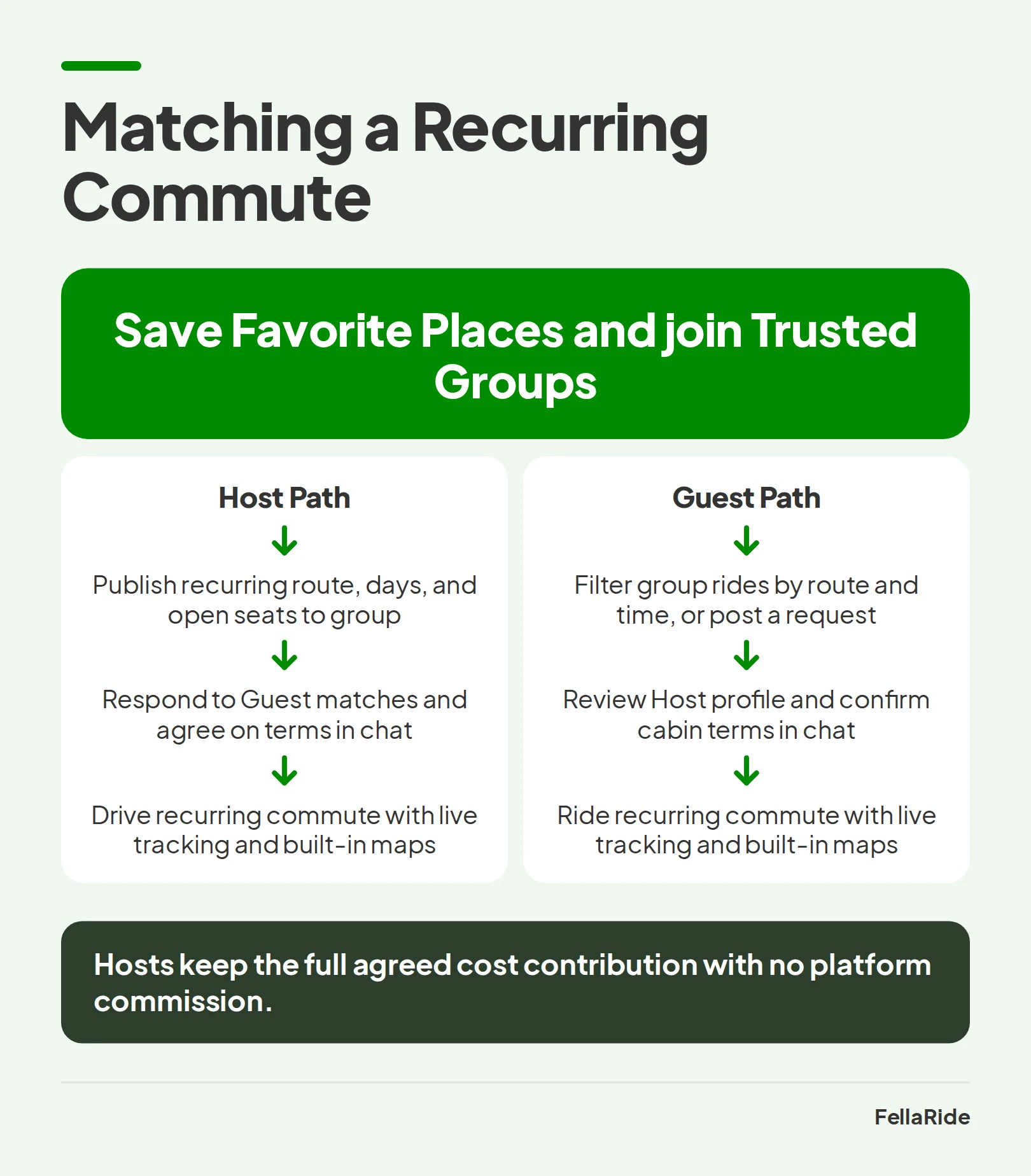
1. Save Your Favorite Places and Join Trusted Groups
Setting up a multi-day commute goes much faster when you don't have to type the same intersections every time you use the app. According to Natural Resources Canada's fuel-efficient driving guide, sharing a ride with others is a direct way to cut personal fuel consumption and reduce road congestion. On FellaRide, preparing your account starts with saving your regular stops and joining the communities that travel your corridor.
Set Up Your Favorite Places
Favorite Places let you store frequent locations like your home, workplace, campus, or regular pickup stops so you can post and search rides faster. These saved addresses remain completely private and exist only to speed up your own planning inside the app. You can add, edit, or remove your saved locations at any time by opening Settings and selecting Manage Saved Addresses.
When choosing which addresses to save, consider picking well-lit, accessible landmarks near highway on-ramps or regional transit stations in addition to your home street. Choosing a straightforward meeting point prevents long detours through quiet residential crescents and keeps morning pickups quick for everyone in the vehicle.
Join Your Workplace or Campus Trusted Groups
Instead of matching you with strangers at random, FellaRide organizes carpooling around Trusted Groups. A Trusted Group is a private or semi-private circle centered on a shared workplace, university campus, neighborhood, or interest. Each user can join up to 5 communities, making it easy to cover both your residential area and your destination campus at institutions like Seneca, Humber, or York University.
Recurring carpools within these groups increase ride density, meaning more people travel per vehicle over every kilometer. Over time, regular participants build trusted micro-communities that lower individual travel expenses and make daily trips more social. If you are comparing transit passes against shared rides for the semester, read our GTA university commuter guide to see how campus groups fit into student schedules.
2. Post a Recurring Multi-Day Ride as a Host
If you have empty seats in your car on your drive to work or class, you can publish a recurring schedule rather than posting single trips every night. Looking at the FellaRide in-app experience shows how multi-day scheduling, built-in maps, and community filters work together in one place. Whether you commute five days a week or run a hybrid Tuesday-Thursday routine, the app adapts to your timetable.
- Open Post a Ride: Tap the posting tool on your home screen and select the recurring option instead of a one-time trip.
- Set your route and stops: Select your origin, destination, and any intermediate pickup stops using your saved Favorite Places and the built-in maps.
- Choose your schedule: Pick your recurring days and departure times to match your weekly shift or lecture hours.
- Enter vehicle and seat details: List your vehicle information, how many seats are open for Guests, and your ride preferences.
- Publish to your communities: Select which of your Trusted Groups can view and request seats on your multi-day listing.
Because FellaRide charges no platform commissions, Hosts keep the full agreed cost contribution to help offset fuel and vehicle operating expenses. You can also choose to offer free rides simply to help fellow members of your community get to campus or work.
Setting clear cabin expectations upfront also makes a weekly routine much smoother over an entire semester or work quarter. Thinking through simple details like trunk space for backpacks, morning music volume, or whether hot drinks are welcome in the car helps everyone start the morning commute on the same page.
3. Search for a Matching Schedule or Post a Ride Request as a Guest
As a Guest, you don't need to rely on rigid schedules that don't fit your workday. Whether you need a seat every weekday morning or just once a week for an in-person lab, FellaRide lets you search existing listings or broadcast your own schedule to your circles. You can check our overview of app-based carpooling pros and cons for GTA commuters to see how digital route-matching compares with solo driving.
Filter Active Rides in Your Communities
Open Search a Ride and filter available listings by your route, departure time, date, and community. Using your saved Favorite Places lets you enter your origin and destination in a couple of taps. When you see a recurring schedule that lines up with yours, inspect the Host's profile, check their verification badge and community ratings, and open a chat before confirming your seat.
Post a Ride Request When No Match Exists Yet
If no Host has posted your exact time window yet, publish a ride request so others in your circles know you are looking. Only members of the specific communities where you post the request can see it, keeping your travel plans within your chosen groups.
- Automatic visibility: Both Hosts and fellow Guests in your selected communities can view your request and reach out if a matching trip opens up.
- Easy edits anytime: You can edit your departure details or cancel an open ride request at any point before a ride is confirmed.
- Clear expiration rules: A ride request stays active until you cancel it, a matching ride is confirmed, or the ride date passes and the system archives the expired request.
4. Coordinate Pickup Details and Cost Contributions in Chat
Once a Host and a Guest connect on a recurring route, the in-app chat is where you turn a match into a predictable weekly habit. In Ontario, Ontario Regulation 419/21 under the Highway Traffic Act defines a car pool vehicle around shared journeys where riders only reimburse actual travel expenses without generating financial gain.
To see how provincial rules treat shared commuter expenses, read our guide on how non-commercial carpooling works in Ontario.
FellaRide provides clear cost-sharing guidelines so Hosts can recover shared travel expenses without turning a commute into commercial transport. Hosts may set or accept a contribution within platform limits, using a recommended minimum fare of $5 per ride (including stops and multi-leg rides) and an informational guideline of $0.20/km.
FellaRide does not process in-app ride payments right now, though a built-in payment system is planned for the near future. Until that system launches, Hosts and Guests settle ride contributions directly with each other using cash or another payment method both sides agree on. Redefine Technologies Inc. may also apply service, processing, or transaction fees, which are disclosed at the time of booking.
Watch out: Keep all pre-trip coordination inside the FellaRide in-app chat and never share payment card numbers, banking details, login credentials, or identity documents with other users. FellaRide does not monitor or secure off-platform messages and is not liable for losses or disputes from sharing sensitive data.
5. Copy Completed Rides and Manage Schedule Changes Responsibly
Once your first week of carpooling wraps up, keeping your listing active for future weeks takes very little effort. If you have questions about managing your account settings or ride listings, you can always check the FellaRide help page for step-by-step guidance.
Duplicate Past Trips Without Spamming Past Guests
When you want to post a new trip that follows an earlier route, FellaRide lets you copy a completed ride so you don't have to re-enter every stop and preference from scratch. You can edit any detail, such as the departure time or available seats, before you publish the new listing. Copying a completed ride does not send automatic notifications to your previous Guests, so you can adjust your schedule privately before inviting anyone.
Tip: After copying a completed ride for the upcoming week, drop a quick message in your in-app chat if you want your regular Guests to know the new listing is live in your Trusted Group.
Handle Cancellations and Schedule Dependency with Care
Shared commuting relies on mutual reliability because both the Host and the Guest depend on each other's timing to reach work or campus on schedule. While route-matching algorithms reduce the friction of finding a partner, a shared carpool naturally requires more coordination than driving solo.
- Cancel promptly when plans shift: If an exam changes, you stay home sick, or a meeting runs late, cancel the affected ride immediately in the app so your carpool partner can make backup plans.
- Protect your account standing: Repeated or careless cancellations disrupt other members' commutes and can lead to account suspension or removal from FellaRide.
- Leave post-trip ratings: Submitting honest mutual ratings and reviews after your trips helps everyone in your Trusted Groups spot dependable commuters.
Learn more about FellaRide